Skip to content
  • Thu. May 14th, 2026
    24x7ServerSecurity

    Blog

    Server Management and ServerSupport services

    • Linux
    • Windows
    • Outsourcing Services
    • cPanel
    • Centos
    • Emergency Services
    freebsd

    How to update FreeBSD

    Byanup

    May 24, 2020 #freebsd, #update, #upgrade

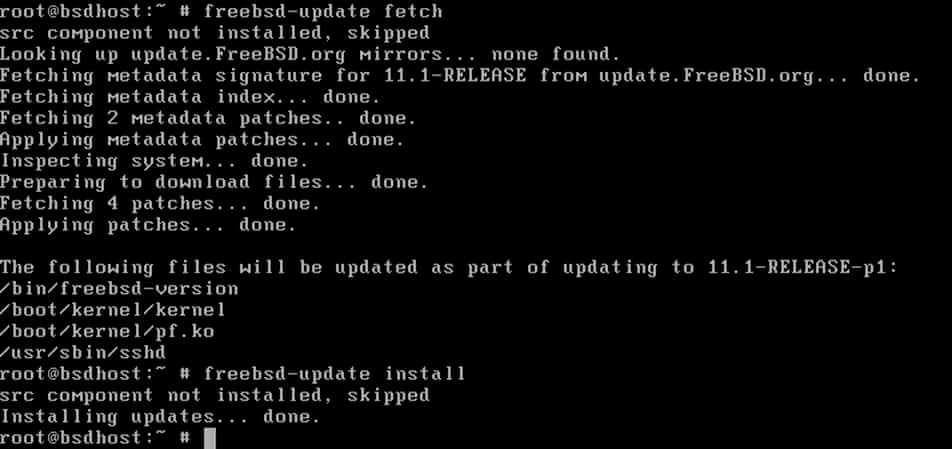
    In order to update FreeBSD, open a console in the system with root privileges and issue the following commands.

    # freebsd-update fetch
    # freebsd-update install
    

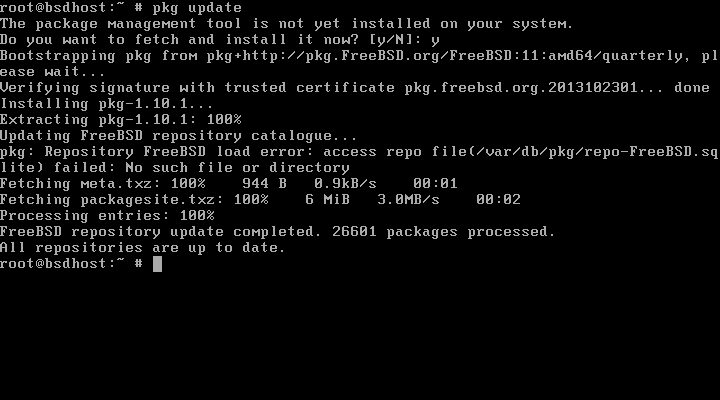
    To update “Ports” package manager and installed software run the below command.

    # pkg update
    # pkg upgrade
    

    Share this:

    • Click to share on Facebook (Opens in new window) Facebook
    • Click to share on X (Opens in new window) X

    Like this:

    Like Loading...

    Related

    Post navigation

    FreeBSD Check The Health of Adaptec RAID Array
    List all physical devices

    By anup

    Related Post

    Centos CloudLinux cPanel CWP Debian directadmin freebsd IIS Linux Ubuntu Windows

    How to Clear Your DNS Cache

    Nov 16, 2022 security
    freebsd Mysql

    Error The Server Quit Without Updating Pid File

    Mar 10, 2021 anup
    Centos Centoswebpanel CloudLinux cPanel CWP directadmin freebsd kali linux Linux

    Bad Magic Number In Superblock

    Nov 5, 2020 anup

    Recent Posts

    • How to Setup DNS Server (Bind) on CentOS 8 | RHEL8
    • How do I install missing dependencies with Apt?
    • What is server security
    • What is solusvm server management?
    • What is windows hosting and why it is important
    Tags
    apache (9) backup (3) Blacklist (3) centos (52) centos6 (10) centos7 (12) centos 7 (11) centos 8 (3) CentOS Web Panel (4) cheatsheet (2) cloudlinux (4) configuration (4) cpanel (38) CWP (6) debian (4) directadmin (4) freebsd (6) Google Drive (2) installation (9) Java (3) kali (3) kali linux (2) let's encrypt (5) linux (25) LVM (2) mariadb (3) mysql (11) network (2) nginx (4) OS (3) plesk (10) RAID (4) removal (3) security (5) server hardening (2) server security (3) SSL (3) Ubuntu (15) ubuntu14 (2) upgrade (3) vnc installation (2) webmin (2) Windows (9) Wordpress (3) yum (3)
    • Apache
    • Centos
    • Centoswebpanel
    • CloudLinux
    • cPanel
    • CWP
    • DDoS
    • Debian
    • directadmin
    • DNS
    • Emergency Services
    • freebsd
    • FTP
    • IIS
    • kali linux
    • Linux
    • Litespeed
    • LVM
    • Mysql
    • Nginx
    • openvz
    • Outsourcing Services
    • Plesk
    • Postfix
    • proxmox
    • RAID
    • RBL
    • Security
    • server management
    • solusvm
    • Technology
    • Ubuntu
    • Uncategorized
    • Windows
    • Wordpress

    You missed

    Centos DNS

    How to Setup DNS Server (Bind) on CentOS 8 | RHEL8

    February 2, 2023 security
    Debian

    How do I install missing dependencies with Apt?

    December 30, 2022 security
    Linux Security

    What is server security

    December 7, 2022 security
    Linux server management solusvm

    What is solusvm server management?

    December 7, 2022 security
    24x7ServerSecurity

    Blog

    Server Management and ServerSupport services

      Proudly powered by WordPress | Theme: Newsup by Themeansar.

      • Home
       

      Loading Comments...
       

        %d